FAQ
On what platforms can I run tests with AltTester® Unreal SDK?
PC, Mac, Android, iOS, WebGL, Console and Unreal Editor.
What programming language can I use to write tests?
C#, Python, Java or Robot Framework.
Can AltTester® Unreal SDK be integrated with Appium?
Yes, AltTester® Unreal SDK can be used alongside Appium. Appium allows you to access the native objects and AltTester® Unreal SDK can be used to access the Unreal objects. For more info regarding how to run tests together with appium check Running tests together with Appium.
What versions of Unreal Engine does AltTester® Unreal SDK work with?
AltTester® Unreal SDK works with Unreal Engine 5.3, 5.4, and 5.5.
Can I use AltTester® Unreal SDK to run tests using device cloud services?
So far, we know that BrowserStack (with BrowserStack Local) works with AltTester®. More info about this here: Running tests using device cloud services.
Regarding Bitbar, AWS Device Farm, and SauceLabs, we have only tested them with the AltTester® Unity SDK, but they may also work for Unreal. These platforms provide access to a virtual machine or Docker container with a cloud-connected device, where you can upload and run your tests after configuring the environment. Some services support Appium automation by offering access to a cloud-hosted Appium server connected to their mobile devices. However, AltTester® Unreal SDK will only work with these services if they support local testing or tunneling with WebSockets, allowing the cloud device to communicate with the AltTester® Desktop app running on your machine.
Do I need access to the source code of the Unreal App to write tests?
In order to run tests using AltTester® Unreal SDK you require an instrumented build of the Unreal App.
I don’t have access to source code, but I do have access to an instrumented build. How can I begin to write tests?
We’ve published AltTester® Desktop, which allows you to inspect the app objects outside the unity editor without access to the source code. More information about AltTester® Desktop can be found in this documentation.
Troubleshooting
I get `waiting for connection on port 13000` popup message when I start my Unreal App
The popup message shows up when you start your instrumented Unreal App. It tells you that the AltTester® Unreal SDK is ready and you can start running your tests.
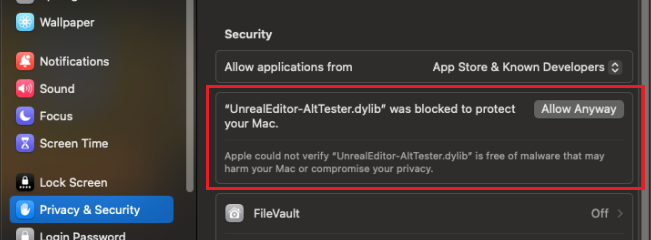
MacOS blocks AltTester® Plugin files due to security verification
If you're unable to open the Unreal Engine project with the AltTester® Plugin enabled on macOS, and you encounter a message stating that Apple could not verify that the `.dylib` file is free of malware, follow one of these steps to resolve the issue.
Download the AltTester® Plugin using wget command:
For Unreal Engine 5.3, use the following command:
wget https://alttester.com/app/uploads/AltTester/sdks/alttester-unreal/AltTesterUnrealSDK-Package-UE5.3.zip
For Unreal Engine 5.4, use this command:
wget https://alttester.com/app/uploads/AltTester/sdks/alttester-unreal/AltTesterUnrealSDK-Package-UE5.4.zip
Remove the quarantine attribute:
Open Terminal and run the following command to remove the quarantine flag from the downloaded file:Go to
UE_5.x/Engine/Plugins/Marketplace/AltTester-Unreal-SDK/Binaries/Macand run:xattr -d com.apple.quarantine UnrealEditor-AltTester.dylib xattr -d com.apple.quarantine UnrealEditor-AltTesterEditor.dylib
Allow the files from Privacy & Security Settings:
Go to System Preferences > Security & Privacy > General and click Allow Anyway for the blocked file (do this for each.dylibfile).