
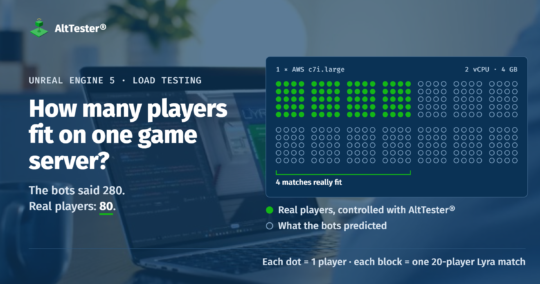
In short: How many players can one AWS server host? That number decides how many servers you need to buy for launch. We measured it on Unreal Engine 5.3.2 dedicated servers, with the engine built from source. We measured it twice: once with the game’s built-in bots, and once with real game clients, simulated and controlled with AltTester®. On an AWS c7i.large, the bots suggested that about 280 players fit on one machine (14 matches of 20 players). With AltTester®-controlled players, only 80 fit (4 matches). If you plan your servers on bot numbers, you may buy only a third of the servers you need. If instead you test with only 5 real players and multiply the result, you would expect only 40 players per machine and buy twice the servers you need. Unreal Insights shows why: most of the extra work goes into sending each connected player the changes in the game that matter to them. We used Lyra’s 20-player matches, but the same method works for 100-player battle royale matches.
The green row is what really fits. Bots make each match look about 4 times cheaper than it is, so you would plan 3.5 times as many players per server as really fit. A match with 5 real players, multiplied up to 20 players, makes each match look 1.7 times as expensive on the CPU and about 5 times on memory (1.6 GB instead of about 0.3 GB). With that estimate, memory runs out at 2 matches, and half of the server goes unused.
What did we compare?
We ran the same Unreal dedicated server in two ways: with the game’s built-in AI bots, and with real players, simulated with real game clients and controlled with AltTester®. We also checked a third shortcut: testing with a few real players and multiplying the result. We used Lyra, Epic Games’ free sample shooter for Unreal Engine 5. It comes with a dedicated server and its own bots, and anyone can rebuild it to check our numbers. We used its Elimination mode, a team deathmatch: two teams play on a small map, eliminated players come back after a few seconds, and the team with the most eliminations wins. It is not a battle royale, but the servers work the same way: each match runs in its own dedicated-server process.
We started them with the server’s NumBots option. Each bot is controlled by AI that runs inside the server process. It moves, aims and shoots using Lyra’s AI. A bot has no game client and no network connection, so the server never has to send it anything.
Real copies of the packaged Lyra game client. They run without graphics on cloud machines and join the server over the network. An AltTester® script (an “AltPlayer”) plays each one through the game’s own controls, the way a person would.
One match with 5 real players and 15 bots. The real players could be human testers; in our test they were controlled with AltTester®. We took its CPU and memory use and multiplied them up to full matches, the way a team with only a few testers might estimate. This is not a separate test: the numbers come from one step of our ramp.
Why 20 players per match?
Lyra’s default match size is 16 players. Its Expanse map has 20 places where players can appear (spawn points), so 20 is the most players it can start at once. We used 20 to stay within what the game was built for. The match size is a setting of the test, not of the method: for a battle royale, you would run 100-player matches and ask the same question.
Are bots enough to load test a multiplayer game?
No. Bots make the server run the game’s logic: moving, aiming and shooting. But they don’t make the server do the work of serving players over the network. A bot lives inside the server process and has no network connection. For each real player, the server works out 30 times a second where the other players are, what changed in the game, and which of those changes that player needs, and then sends them those changes. This work is called replication, and a load test with only bots leaves it out.
To measure that work, you need real connections to the server. These are the main ways to create load, and what each one tests:
- Server-side bots. Cheap and easy, but there are no connections, so the server sends no updates.
- Thin clients, or replaying recorded network traffic. Small programs that connect to the server like a game client, but only send the messages you script or recorded. They add network load and are cheap per player. But Unreal’s network messages depend on what happened before, so recorded traffic can’t simply be played back: you need a program that speaks the game’s network protocol. You also have to update it every time the game’s network code changes, and it doesn’t react to the server the way a player does.
- Replay Runs in Epic’s Automated Performance Testing plugin. This plays back a recorded match inside one game client, to measure how well the client runs. There is no server and no connection, so it doesn’t load the server.
- Real game clients, controlled with Gauntlet. Gauntlet is Epic’s framework for starting a server and many real game clients and running tests on them. The players’ behaviour is test code that you write in C++ and build into the game.
- Real game clients, controlled with AltTester®. What we used. The players’ behaviour is a script that runs outside the game and plays through the game’s own controls, so you can reuse your existing AltTester® test suite.
- Human playtests. The most realistic, but expensive and hard to repeat.
Any method with real game clients loads the server the way players do. We used AltTester®; the same measurements work with Gauntlet or with a playtest.
| Way to create load | Server sends updates | Runs the real game client | Plays like a player | Effort |
|---|---|---|---|---|
| Server-side bots | no | no | roughly | low |
| Thin clients or traffic replay | yes | no | only what you script or recorded | high, for every game and every network code change |
| Replay Runs (Automated Performance Testing) | no, there is no server | yes, one client | replays one recorded match | low, but tests the client, not the server |
| Real clients, controlled with Gauntlet | yes | yes | what your test code does | medium to high, C++ test code inside the game |
| Real clients, controlled with AltTester® | yes | yes | yes, through the game’s own controls | medium, scripts outside the game, reuses your tests |
| Human playtest | yes | yes | yes | very high, hard to repeat |
How much more does a real player cost the server?
In one 20-player Lyra match, 20 AltTester®-controlled players made the server work 5 times as hard as 20 bots did, and use 3.5 times as much CPU. The server updates the game 30 times a second (a 30 Hz tick rate), so each update must finish within 33 ms. Both versions stayed well within that limit, so a test with a single match would say “fine” either way.
To see how the cost builds up, we replaced the bots with AltTester®-controlled players a few at a time: 1, 5, 10, and then all 20.
| 20 players in the match | Server time per update | Of which sending updates | Server CPU | Server memory |
|---|---|---|---|---|
| 20 bots | 1.4 ms | 0 ms | 7% of a core | 399 MB |
| 19 bots + 1 real | 2.7 ms | 0.5 ms | 11% | 395 MB |
| 15 bots + 5 real | 3.3 ms | 1.2 ms | 13% | 398 MB |
| 10 bots + 10 real | 3.9 ms | 1.9 ms | 14% | 405 MB |
| 20 real | 7.3 ms | 4.6 ms | 25% | 430 MB |
- The first real player adds the most. As soon as one real game client joined, the server started sending it updates. That took 0.5 ms of each update. With only bots, it took nothing.
- Each further player added a little more. Players 2 to 10 added about 0.16 ms each, and players 11 to 20 about 0.27 ms each. The cost per player grows because each new player is one more client to update, and one more character that all the other clients must hear about.
- Most of the extra work comes from the players being connected, not from what they do. In the mixed matches, many AltTester®-controlled players were still waiting to appear on the map and never fired, but the time spent sending them updates still grew. In an earlier run, server CPU went up to 25% as soon as the 20 game clients joined, and only to about 30% once they started fighting.
How to load test a multiplayer game with realistic players
- Use the build your players will run. We added the AltTester® Unreal SDK to Lyra and built a Linux game client and a Linux dedicated server. The SDK compiled and ran on Linux with no changes. This way, the network code and its settings are the ones you ship.
- Make the players behave like players. Our AltPlayers are C# scripts that use AltTester®. They move around, aim, fire, reload, jump and throw grenades through the game’s own controls. Four personalities and a random seed per player keep them from all doing the same thing. Most of the actions came from our existing AltTester® test suite.
- Run the game clients without graphics. Start them with
-nullrhiand limit the frame rate (we used 10 frames a second). Each copy still runs the whole game, and used about 0.4 GB of memory in a 20-player match. - Keep the real network path. Put the server and the clients on separate machines, and measure on the machine type you will buy. On a 2-vCPU machine (one physical core), each match needed 50% more CPU than on a 4-vCPU machine.
- Measure against the 33 ms limit. Record the server’s time per update, its CPU and its memory, only while matches are being played. Unreal Insights shows the time per update and where it goes. Memory that keeps rising is a bug.
- Start with bots, then add real players. Run the same steps with bots first, then with AltTester®-controlled players, and change one thing at a time. We ran 3, 5, 7 and 9 matches with bots, and 2, 3, 4 and 5 matches with AltTester®-controlled players.
- Check that the players really played. In our 5-match run, 95 of 100 AltPlayers fought, and fired over 13,000 shots with no errors. When we gave the game too little time to start, the first commands hung for almost three minutes. We now wait 90 seconds, plus 10 seconds per match.
- Watch the machines that run the clients. With 100 clients, our 32-vCPU client machine was overloaded, so the clients sent fewer inputs than real players would. So our numbers for AltTester®-controlled players are a lower limit: real players would cost at least this much.
- Confirm on the machine you chose. Don’t estimate from other machines. We ran 5 matches with AltTester®-controlled players on a c7i.xlarge again before recommending it.
What do the AltTester®-controlled players do in a match?
Each one is a small C# script, called an “AltPlayer”. It plays one real game client through the game’s own controls, and decides what to do about twice a second. There are four personalities, and each player has its own random seed, so 20 of them don’t all move the same way.
Finds its own character, position and team. Every 1.5 s it lists the other players’ characters to find the nearest enemy.
find objectsEnemy within its persona’s range? Roll the dice against its persona’s engage chance: fight, or keep roaming.
seeded randomFight: aim with a little random error, fire 2-4 shots, strafe, reload, throw a grenade, melee up close.
Roam: walk to a random spawn point, weapon pickup or jump pad; jump, dash or turn when stuck.
key presses, aimRandom jumps, dashes and crouches, more or less often by persona. If its character died, it waits for the respawn.
repeat| Persona | Starts a fight within | Chance to engage | Aim error | Typical habit |
|---|---|---|---|---|
| A aggressive | 40 m | 90% | ±2° | pushes toward enemies, strafes often |
| E explorer | 15 m | 60% | ±4° | keeps moving between waypoints |
| C camper | 50 m | 80% | ±1° | stops 5-15 s at each spot, looks around, crouches |
| R erratic | 25 m | 50% | ±6° | jumps, dashes and strafes a lot |
Every random choice comes from the player’s own seed, so a run with the same seeds makes the same choices and can be repeated. The script sends the same inputs a person would; the game client sends them to the server over the network.
The AWS setup we used
Three machines in AWS eu-central-1 (Frankfurt): one for the game clients, one for the game servers we measured, and one for the AltServer.
AltTester® Unreal SDK, limited to 10 frames a second. One process runs all the AltPlayers.
Separate Lyra dedicated servers, one 20-player match each. This is the machine we measured.
Passes commands between the scripts and the game clients over a secure WebSocket connection. It used less than half its CPU.
Where does the server’s time go with real players?
We also recorded the 20-bot match and the 20-player match with Unreal Insights, Epic’s tool for seeing where a program spends its time. With 20 bots, the server’s main thread took 2.0 ms per update. With 20 AltTester®-controlled players, it took 11.3 ms. 8 ms of the difference went into sending updates to players. With bots, all of that work is zero, so a test with only bots cannot show it.
| Server main thread, time per update | 20 bots | 20 real |
|---|---|---|
| All work on the main thread | 2.0 ms | 11.3 ms |
| Sending updates to players (replication) | 0 | 8.0 ms |
| Receiving messages from players | 0 | 1.1 ms |
| of which checking players’ movement | 0 | 0.8 ms |
| Moving the characters | 0.17 ms | 0.54 ms |
| Physics | 0.20 ms | 0.43 ms |
| Animation | 0.52 ms | 0.60 ms |
| Everything else (gameplay, AI, timers) | 1.6 ms | 1.9 ms |
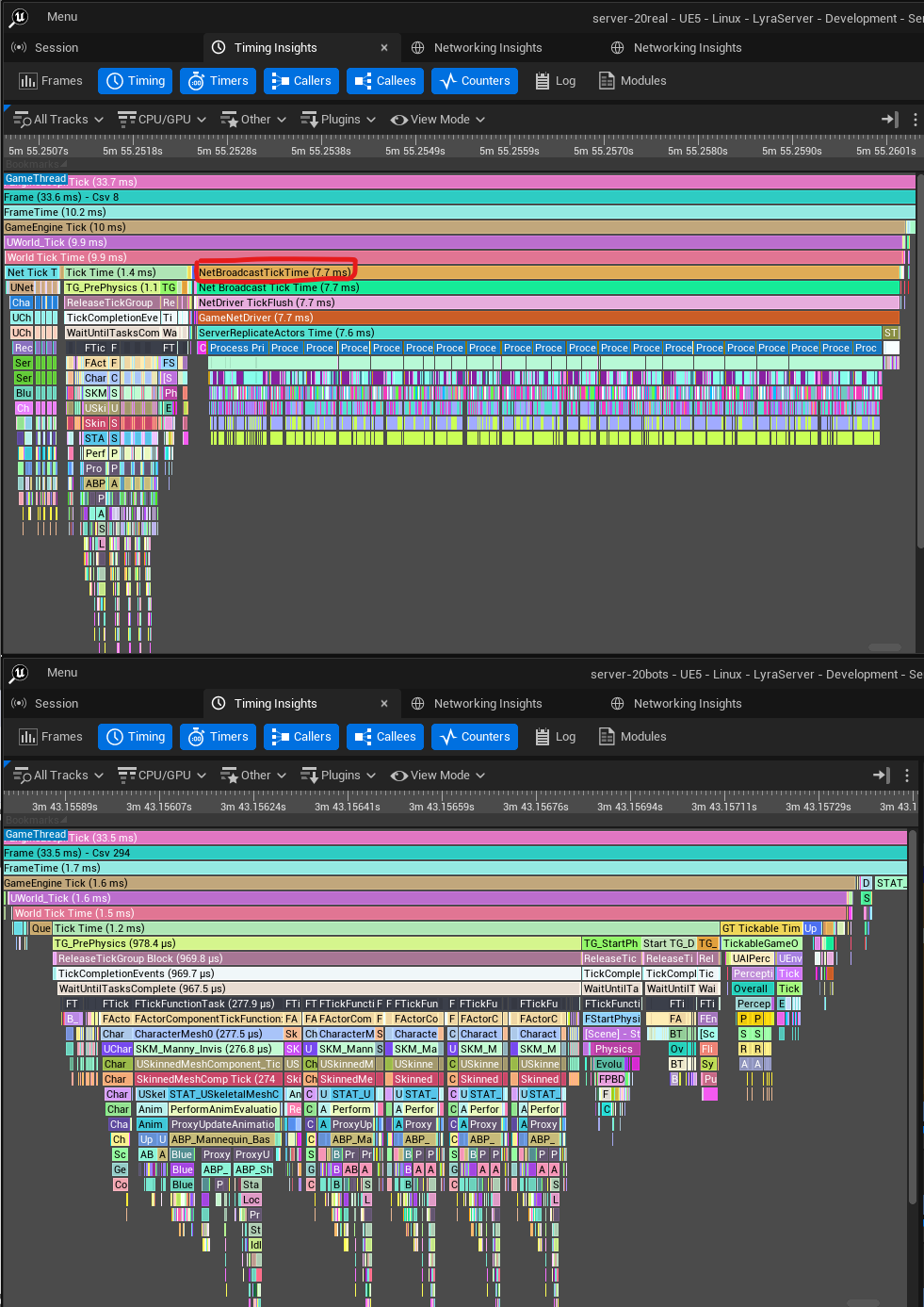
Unreal Insights also shows which parts of the game cost the most to send. These are the biggest, in ms per update, with 20 AltTester®-controlled players:
The rest of the 8 ms is shared by all of them: finding what changed since the last update, and choosing what each player needs to receive.
- This shows a game team where to start optimizing. Unreal Insights lists the parts of the game that cost the most to send, so the team can start with the biggest ones.
- Checking players’ movement is the second biggest cost. Each player sends its movement 30 times a second, and the server checks it and corrects it when needed. Bots move inside the server, so this work doesn’t happen.
- Some of the cost is only in development builds. A debugging tool (the gameplay debugger) took 0.06 ms per update, and it is not included in the builds you ship. Measure the same type of build that you will ship.
How many players fit on one AWS server?
On an AWS c7i.large (2 vCPU, 4 GB), Lyra handled 180 players smoothly with bots, but only 80 with AltTester®-controlled players. We split the players into 20-player matches, and each match ran in its own dedicated-server process. We kept adding matches until they could no longer keep 30 updates a second. When you plan servers you count matches, but the number of players is what the machine really serves. These numbers only hold for 20-player matches. When we put 100 players in a single match, it slowed down long before five matches of 20 did.
| Players on the c7i.large | In 20-player matches | Matches smooth (30 updates/s) | Slowest match, per update | CPU used, peak | Memory used |
|---|---|---|---|---|---|
| 60 bots | 3 | 3 of 3 | 33 ms | 0.41 of 2 | 0.9 GB |
| 100 bots | 5 | 5 of 5 | 33 ms | 0.76 of 2 | 1.4 GB |
| 140 bots | 7 | 7 of 7 | 33 ms | 0.92 of 2 | 1.8 GB |
| 180 bots | 9 | 9 of 9 | 33 ms | 1.21 of 2 | 2.3 GB |
| 40 AltTester®-controlled players | 2 | 2 of 2 | 33 ms | 0.89 of 2 | 0.7 GB |
| 60 AltTester®-controlled players | 3 | 3 of 3 | 33 ms | 1.24 of 2 | 1.0 GB |
| 80 AltTester®-controlled players | 4 | 4 of 4 | 33 ms | 1.71 of 2 | 1.2 GB |
| 100 AltTester®-controlled players | 5 | 0 of 5 | 37 ms, peaks of 50 | 2.00 of 2 | 1.5 GB |
- With bots, each 20-player match used about 0.075 CPU cores and 230 MB of memory. Memory runs out first, at about 14 matches, or 280 players.
- With AltTester®-controlled players, each 20-player match used about a third of a CPU core. At 100 players (5 matches), the CPU ran out, and all five matches slowed down at the same time.
- For 100 AltTester®-controlled players, the right machine was a c7i.xlarge (4 vCPU, 8 GB). All five matches kept 30 updates a second, and the CPU peaked at 37%.
Can you test with a few players and multiply?
No. A few real players multiplied up make the server look about twice as expensive as it really is. Testing with bots only makes the server look cheaper than it is. Testing with a few real players and multiplying makes the opposite mistake. In our ramp, one match with 5 real players (controlled with AltTester®) and 15 bots used 14% of a CPU core at peak and 398 MB of memory. We multiplied that by 20 to get 100 players, and compared it with the 100 AltTester®-controlled players we really ran on a c7i.xlarge:
| 100 players | 5 real players, multiplied by 20 | Measured: 100 real players in 5 matches | The estimate is |
|---|---|---|---|
| CPU, average | 2.6 cores | 1.11 cores | 2.3 times too high |
| CPU, peak | 2.8 cores | 1.48 cores | 1.9 times too high |
| Memory | 8.0 GB | 1.5 GB | 5.3 times too high |
With the estimate, you would need 8 GB of memory for the game servers alone, so you would buy a c7i.2xlarge (8 vCPU, 16 GB). The c7i.xlarge, at half the price, ran all 100 players with its CPU at 37% at the peak. There are two reasons why multiplying doesn’t work:
- Much of a match’s cost doesn’t depend on the number of players. The map, the world and the server process’s memory cost the same with 5 players as with 20. Multiplying by 20 counts that cost 20 times, but 100 players only need 5 matches.
- Each new player costs more than the one before. The server sends every player updates about everyone else, so more players means more updates per player. If you take what one more player adds in a small test and multiply that instead, you get the opposite mistake. From 5 to 10 real players, each one added 0.11 ms per update. At that rate, a full 20-player match would need 5.0 ms per update. It needed 7.3 ms.
How should you plan your game-server infrastructure?
Plan from the cost of one match with realistic players, at your real match size, on the machine type you will buy. In our Lyra test, bots made that cost look about 4 times smaller than it really was, and a few real players multiplied up made it look about twice as big. Lyra is a small sample game, so in your game the gap can be different, and often bigger: the more a player’s connection costs the server, the more optimistic bot numbers will be. This is how we would turn a load test into a server plan:
- Measure one full match. Run one match at your real size (20 players for Lyra, 100 for a battle royale) with AltTester®-controlled players. Record the CPU, memory and network use of the server process. Don’t test with a few players and multiply: part of a match’s cost is the same whatever the number of players, and each new player costs more than the one before. In our test, a 5-player match multiplied up to 100 players asked for twice the CPU and 5 times the memory that 100 players really used.
- Find what runs out first. Put more and more matches on one machine until the server can no longer keep 30 updates a second. Memory seemed to be the limit when we used only bots, but once we added AltTester®-controlled players, it turned out that the CPU was the limit. Your capacity is the last step where all matches stayed smooth.
- Leave room for busy moments. Some moments in a match need more work than others. Plan so that the CPU stays well below 100% at its peak. At 100%, all matches slow down together.
- Compare machine types per match. A Lyra match needed 0.33 CPU cores on a c7i.large, but only 0.22 on a c7i.xlarge. The c7i.xlarge has 4 vCPUs, which are two full physical cores. It ran 5 matches with its CPU at 37% at the peak.
- Work out how many machines you need. Divide the number of matches you expect at peak by the number of matches per machine. Then add room for busy moments, and spare machines in each region.
- Measure again after big changes. New maps, new game modes and changes to the network code all change the cost of a match.
| 1,000 concurrent Lyra matches | Matches per machine | Machines needed |
|---|---|---|
| c7i.large, planned with bots | ~14 | ~72 |
| c7i.large, with AltTester®-controlled players | 4 | 250 |
| c7i.xlarge, with AltTester®-controlled players | 5 (measured, at 37% CPU) | 200 or fewer |
What does it cost?
For Lyra, the cloud bill was small. One full run cost a few dollars, and a whole day of tests cost well under $20. Don’t plan your budget on that number. Lyra is a small sample game, and a real game’s client and server need more CPU and memory. Also, the cloud bill is only one of four costs. The biggest cost is engineering time: writing the player scripts and making the game client and dedicated server builds. That includes building Unreal Engine from source, which you need for a dedicated server.
1. Cloud machines: the game clients cost the most
Every simulated player is a full copy of your game client, running without graphics. The machines for the clients are most of the bill. The game servers you measure and the AltServer are a small part of it.
| Per simulated player | CPU | Memory | Players per c7i.8xlarge | Cost per player-hour |
|---|---|---|---|---|
| Lyra (measured) | ~0.5 vCPU | 0.4 GB | ~60 | ~$0.03 |
| A heavier real game (example) | 1-2 vCPU | 2-4 GB | 16-32 | $0.05-0.10 |
A quick way to estimate the cost is: players per match × matches you want to test × cost per player-hour × hours of testing. For example, testing 5 battle royale matches of 100 players means 500 players. If each client needs 2 vCPU, that is about 32 large client machines: roughly $50 an hour on demand, or about $20-25 on spot. A half-day test then costs a few hundred dollars in cloud machines.
2. Engineering: the player scripts and the test setup
This is the biggest cost. The player scripts and the builds are where most of the time goes, and the scripts are specific to your game:
- Building the engine: Unreal only builds a dedicated server from the engine’s source code. You need access to Epic’s source code on GitHub, and building the engine took us about an hour on a 32-vCPU cloud machine.
- Preparing the game: adding the AltTester® SDK, and building a game client without graphics and a dedicated server.
- Player behaviour: scripts that join, move, fight and play your game’s main loop the way players do. They need enough variety that they don’t all move the same way. If you already have an AltTester® test suite, you can reuse many of its actions, as we did.
- The test setup: starting and stopping machines, adding matches step by step, collecting the server measurements, and checking that the players really played.
- Upkeep: keeping the scripts working as the game changes, like any other tests.
3. AltTester® licences
Load tests run many AltTester®-controlled clients at the same time, so the licence has to cover that many connections at once. See AltTester® pricing, or ask us for a licence sized to your test.
4. How often you run it
Running tests more often multiplies the cloud cost, so match the size of the test to the question:
- Full-scale capacity test: before launch, before big events, and after major changes to content or network code. This is where you decide how many matches fit on one machine.
- Small regular runs, once you have a baseline: after the full-scale test, run one server machine with a few full matches every night or every week. Compare each run with the baseline. This shows you right away if a change makes a match need more CPU or memory, and whether your optimizations keep improving the numbers over time. These runs are cheap.
Compare the total with the other side of the decision: on launch day, too few servers for your players (for Lyra, bot numbers would have bought about 3.5 times too few), or servers bought for bot numbers you can’t actually use.
How does this approach scale?
The cost grows in a straight line with the number of players. Each simulated player is one more game client, so twice the players means twice the client machines. To scale up, you mostly add client machines. The AltServer was not the limit: one t4g.micro handled 100 clients and 100 scripts with less than half its CPU, and you can add more AltServers for larger runs.
- Games with separate matches of 20 to 100 players: a few hundred AltTester®-controlled clients are enough to fill several server machines and answer the capacity question.
- Thousands of players in one world: a full game client per player gets expensive. Use bots or thin clients for the crowd, and a few dozen AltTester®-controlled clients among them. These measure what real players cost, and check that the game still works.
- At any scale, AltPlayers decide what to do every half second. They put realistic load on the server, but they don’t aim like real players.
FAQ
How do I load test a multiplayer game?
Run many copies of your real game client on cloud machines, without graphics, and control each one with an AltTester® script. Connect them to your dedicated server. Add players step by step, and measure the server’s time per update against its limit, along with its CPU and memory.
Can I load test with bots only?
Bots show the cost of the game’s logic, but not the cost of serving connected players. In our test, bots suggested that about 3.5 times as many players fit on one server as really did.
Can I test with a few players and multiply the result?
No. Part of a match’s cost is the same whatever the number of players, and each new player costs the server more than the one before. In our test, a match with 5 real players, multiplied up to 100 players, asked for about twice the CPU and 5 times the memory that 100 players really used. Measure one full match, then add matches until the machine runs out.
How many players fit on one AWS server?
It depends on your game, your match size and your machine type. With AltTester®-controlled players, a 2-vCPU c7i.large held 80 Lyra players (four 20-player matches). A 4-vCPU c7i.xlarge held 100 players, with its CPU at 37%. For a 100-player battle royale, measure one match first: it may need a whole machine.
How do I plan game-server infrastructure for launch?
Measure the cost of one match with realistic players, at your real match size. Find what runs out first, and leave room for busy moments. Then divide the number of matches you expect at peak by the number of matches per machine. Measure again after big changes to content or network code.
How do I run Unreal game clients without graphics for testing?
Start a packaged Linux client with -nullrhi -nosound and limit its frame rate. It runs the full game, but draws nothing.
What does a realistic load test cost?
There are four costs: cloud machines for the game clients (most of the cloud bill), the engineering work on the engine build, player scripts and test setup, AltTester® licences for the clients that run at the same time, and how often you run the test. Our Lyra tests cost under $20 in cloud machines, but a real game needs more per client, so measure one client first. The AltTester® services team can also run the test for you at a fixed price.
How do I find out what slows my Unreal server down under load?
Start the server with -trace=default,net,counters,stats -NetTrace=1 during a load test, and open the recording in Unreal Insights. Its timing view shows how long each part of the game takes on the server. Its networking view shows how much data each part sends. Use real connected clients: with bots, the server sends no updates, so that work doesn’t show up.
What is replication in Unreal Engine?
Replication is how an Unreal server works out which changes in the game matter to each connected player, and sends them those changes. In our Unreal Insights recording of a 20-player Lyra match with AltTester®-controlled players, it took 8.0 of the server’s 11.3 ms per update on average, more than two thirds of its work. With bots, it took nothing.
Planning servers for your game?
If you are building a battle royale, an extraction shooter or any other multiplayer game with matches, we can help you find out how many of your matches really fit on one server. We use real players, simulated and controlled with AltTester®, with your build, your maps and your match size. We help with preparing the game, writing the player scripts and setting up the cloud machines.
Our services team can also run the whole load test for you at a fixed price: from preparing the game and writing the player scripts to the cloud runs and the server recommendation. Tell us your game, your match size and your target platform, and we’ll send you a quote.