
In short: Ads pay for free-to-play games, so a broken ad costs revenue. Ads are hard to automate because the ad is not part of the game: the ad network opens its own screen on top of it. With test ads, automated tests work well: they check that each placement shows at the right moment, that rewards arrive, and that the game carries on after the ad. Finding ads that fail for players is a different problem, and the problem is volume. On real games, a test device sees about 500 ads a day, mostly the same ones, while your players see millions. Your analytics have that volume, so good ad logging in the game wins there every time.
Automated tests answer the first two well, on every build. The last two need the volume of real players.
Why are ads important, and why are they hard to automate?
In a free-to-play mobile game, ads pay for a large part of the game. When an ad breaks, players notice it and so does revenue: the reward never arrives, the game freezes after the ad, or the ad shows at the wrong moment.
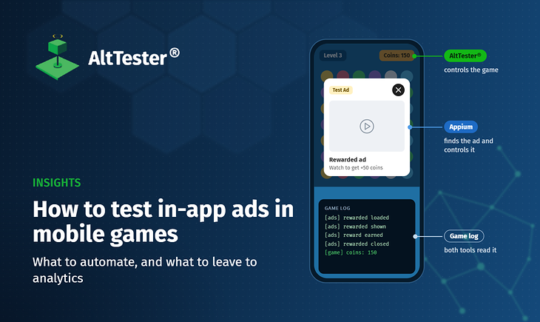
These flows are hard to automate because the ad is not part of the game. The ad SDK opens its own native screen on top of the game engine. A game automation tool sees the game’s objects but not the ad, and a mobile UI tool sees the ad but not the game. A test of the whole flow needs both. In this article, AltTester® drives the game and Appium drives the ad. We chose Appium because it is widely used and works on Android and iOS, but any tool that can drive the device’s native screens can do this part, for example UiAutomator or Espresso on Android and XCUITest on iOS.
- Gems, buttons, moves left
- Hooks the game exposes for tests
- The ad network’s own screen
- Its close button, when it has one
- Loaded, shown, reward earned, closed
- Readable while the ad is up
None of this depends on the game engine. A test needs a tool that sees the game’s objects, a tool that sees the native screens, and a log that both can read. AltTester® works with Unity and Unreal games, and we used Unity’s free sample game for the demo.
Test ads and real ads are two different problems
Ad networks serve test ads, which are predictable and safe to show and tap as often as you like. Real ads vary endlessly: different close buttons, countdowns, playable ads and store redirects. Automated views and clicks on real ads can count as invalid traffic, which ad providers’ rules often forbid. Before you automate anything against live ads, confirm with each ad provider that it fits their terms of service and that the traffic is treated as testing. Registering the devices as test devices with the ad network is one way to do that.
What do mobile game teams want to test about ads?
Each placement fires where the design says, and nowhere else.
The player gets the reward only after watching the whole ad, and gets it only once.
The screen doesn’t freeze, and the player keeps their progress.
Teams want to know which ads don’t load and which ad network has problems.
No ad shows content that is wrong for the players’ age, such as adult content, weapons or gambling.
The first three are about the game’s own code, and automated tests answer them well. Getting the game to a placement is often the hardest part: losing a level is easy to force, but a shop that opens after level 30 is not. Hooks in the game that set up the state directly, called from AltTester®, keep these tests fast. The last two questions are about what the ad networks serve, and they need a different approach.
Finding bad ads is a volume problem
Studios with many ad-funded games often want to catch bad ads: ads that don’t load, broken creatives and problems with one of their ad providers. An automated test can check that a few providers and a few ads display correctly, because it can go through a handful of them. It can’t find which of millions of ads fail, because one device sees very few ads.
The automated numbers come from our work on real games: about 500 ads a day on one device, with pauses between ads to give the ad networks time to bid. Most of those 500 are the same ad, over and over. Your players see a real variety of ads. The tester number is an estimate, and the player numbers are an example; put in your own.
Manual checks have the same problem as automated ones. A tester can work on 3 or 4 devices at a time, and even testing all day, sees a few hundred ads. Test devices also see little variety: the same ad comes back over and over, while your players see the whole range. Your real players have the volume and the variety, and so do your analytics. If you focus on good ad logging in the game and analytics on top of it, per provider and placement, you see the problems that matter, every day. The same logging also makes automated tests easier to write.
Ads also have to suit your players. An ad for adult content, weapons or gambling has no place in a game rated for children, and Apple’s App Review Guidelines require ads to be appropriate for the app’s age rating. Ad networks give you controls rather than promises: AdMob lets you cap the ad content rating and block sensitive categories, and other networks have similar settings. A test can check that the game asks for the right rating, because the setting is in the game’s code and the game can write it to its log. Only volume finds the ads that slip through, so let players report ads from inside the game, which Apple also requires, and read those reports next to your analytics. Most players close a bad ad without reporting it, so the reports show only part of the problem.
What are the ways to test ads?
Manual checks
AnswersA tester sees whether placements and rewards look right.
LimitsSomeone has to repeat it by hand every release.
Automated tests with test ads
the demo below
AnswersThe tests check placements, rewards and recovery on every build.
LimitsThe tests only see test creatives.
Automated tests with real ads
AnswersThe tests show whether the game copes with real creatives and store redirects.
LimitsThe ad providers’ terms must allow it, and real ads are hard to handle automatically.
AI models that clear real ads
AnswersA model can close ads that no locator can find a close button for.
LimitsWe have run local models that do this. They work, but they take a lot of training and a lot of time per ad, for little gain over dismissing the ad whenever a difficult one shows up. Most ads can be waited out or closed with regular automation. When a difficult one can’t, the test dismisses it and waits for an ad it can close to check the reward.
In-game ad logging and analytics
AnswersThe data shows which ads fail for real players, per network and placement.
LimitsIt is only as good as the game’s ad logging.
Most tests don’t need to watch the ad. For interstitials and most placements, the questions are whether the ad showed and whether the game carried on afterwards. A test can tap the close button, which works well with test ads, or get rid of the ad another way: on Android, relaunching the game’s own screen closes the ad and keeps the level, and restarting the app always works but loses the level. Rewarded ads are the exception. The test has to let a rewarded ad play to the end, because the game only grants the reward after the ad finishes, and the reward is what the test checks.
The demo: Gem Hunter Match with AdMob test ads
We added a banner, a rewarded ad (“Out of moves! Watch ad: +5 moves”) and an interstitial to Gem Hunter Match, Unity’s free match-3 sample, using Google’s test ad units. Three Python tests cover them on a Pixel 8. AltTester® plays the game and checks the result, and Appium waits for the ad’s own screen and closes it.
The three tests in real time: each step on the left (green for AltTester®, blue for Appium), the phone on the right. The video is 100 seconds long. It pauses on every check to show what the test expected, what it read and which tool read it, and a green line points to the proof on the phone.
A test hook leaves one move, and AltTester® swipes a match.
AdMob opens its own screen.
Appium waits out the countdown and taps close.
The player has 5 more moves, and the board plays.
The rewarded-ad test. The interstitial test is the same handover after the player taps “No thanks”.
Three things make the tests work. First, the game logs every ad event, so a test can read what happened while the ad covers the game:
13:30:02.820  [AdsDemo] rewarded:ready
13:30:06.832  [AdsDemo] continue:offered
13:30:07.013  [AdsDemo] rewarded:showing
13:30:12.627  [AdsDemo] rewarded:earned 10 coins
Second, two test hooks in development builds get to the ad quickly: one leaves a single move, and the other names a pair of gems that makes a match. Third, Appium keeps tapping the close button until the ad is gone, because video ads only accept the tap after a countdown. Even Google’s test ads vary: in one run, AdMob served a creative whose close button had no label, and the test couldn’t find it. When we can’t find a way to close an ad, we restart the whole game and wait until the same placement gets an ad that can be closed.
The demo uses Unity 6000.0.85f2, the AltTester® Unity SDK 2.3.2, the Google Mobile Ads Unity plugin 11.6.0, Appium 2.15.0 with the UiAutomator2 driver, and pytest. It runs AdMob test ads on Android; real ads, mediation and iOS are not part of it.
Test builds or release builds?
Many teams want to test the build they ship, without debug features. That makes sense, because release builds break in their own ways: test ad IDs can stay in the release, code stripping can remove an ad network’s adapter, or the consent screen can block the first ad.
Testing only release builds has a cost. A release build has no AltTester® SDK and no test hooks, so a test sees only the native screens and the pixels. It can’t read the moves counter or jump straight to a placement, so every test takes longer and breaks more easily. A release build also serves real ads, so the ad providers’ terms apply to every run.
We suggest running most tests on an instrumented build that uses the release configuration: the real ad unit IDs, the same mediation setup and the same consent flow, on devices registered as test devices. On top of that, run a short smoke test on the release build itself. The smoke test starts the game, checks that the first ad loads with the production IDs, and checks that the game carries on after it.
FAQ
How do you automate tests of in-app ads in a mobile game?
You use a game automation tool for the game and a mobile UI tool for the ad. In our demo, AltTester® plays the game up to the ad and checks the result afterwards, and Appium waits for the ad’s own Android screen and closes it.
Can you run automated tests with real ads?
Yes, but first confirm with each ad provider that automated tests against live ads fit their terms of service, and that the traffic is treated as testing, for example by registering the devices as test devices. Otherwise, automated views and clicks can count as invalid traffic. Most tests should get past real ads by dismissing them or restarting the app, not by watching them.
Can automated tests find bad ads and ad network problems?
They can find only a few of them. On real games, a device running ad tests all day sees about 500 ads, mostly the same ones, while a game with a million daily players serves millions. Good ad logging in the game and analytics on top of it find these problems much better.
Should ad tests run on release builds?
Run most of them on an instrumented build that uses the release configuration, and add a short smoke test on the release build itself. A release build has no test hooks and no access to the game’s objects, so full tests on it are slow and fragile. The smoke test still catches problems that only happen in the release, such as test ad IDs left in the build.
Testing the ads in your game?
We can help you decide what to automate and what to leave to analytics, add ad logging and test hooks to your game, and write tests for your placements and rewards with AltTester® and Appium. Tell us your game, your engine and your ad networks.