
We’re excited to announce a fresh release for Unreal users: AltTester® Unreal SDK 1.3.0 is now available. This new version of the Unreal SDK makes your tests more stable, makes connection problems easier to debug, and adds support for more of the ways teams build and run Unreal games. Additionally, we’re also releasing AltTester® Unity SDK 2.4.0, with cleaner production builds, more realistic touch input, and Unity 6.5 support.
Here’s what’s new.
Main features shipped with AltTester® Unreal SDK 1.3.0
AltId: persistent IDs for your actors
Give every actor a unique, permanent ID and find it with By.ID. The ID doesn’t change when the actor is renamed, moved, or reloaded, so your selectors keep working when the level changes.
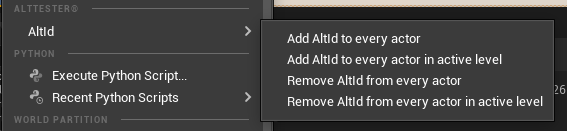
- Add or remove AltIds in one click from Tools → AltTester® → AltId, in the Unreal Editor, for the active level or for every level in the project
- Works with World Partition levels, and you don’t need to load the regions first
- Duplicated actors get a new AltId, so IDs stay unique
- Only your project’s levels are changed. Engine content isn’t touched
Stable object names across level loads
Object names no longer change each time a level is loaded. Widgets don’t get the random _C_2147… suffix anymore, and actors use the label you gave them in the editor.
- Tests recorded in AltTester® Desktop replay correctly after LoadScene, after a restart, and in packaged builds
- Repeated widgets (list rows, settings entries) keep the same order, so indexed selectors like [0] and [1] always point to the same item
- Selectors are easier to read and write because they use the names you see in the editor
Note: Your existing tests may break after you upgrade, because some objects now have different names. Update every selector that uses an old generated name, such as W_LyraFrontEnd_C_2147… → W_LyraFrontEnd, or the internal name of an actor that has a label, such as Capsule → LabeledCapsule. To find the new names, check the Objects Hierarchy in AltTester® Desktop or record the steps again.
Logs right inside the game
The AltTester® connection popup now has a Logs button. You can read the SDK logs on the device, without a cable, without adb logcat, and without Xcode.
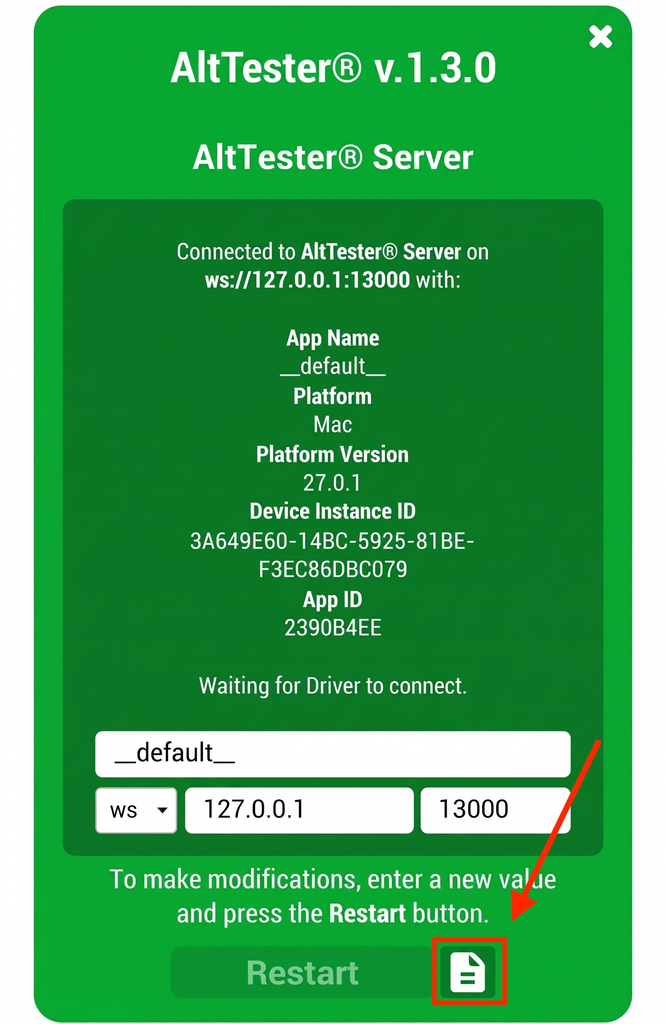
- Filter by info, warnings, and errors, and search as you type
- Copy the logs to share them with your team, or clear them
- Logs are captured from startup, so you can also see what happened before the app connected
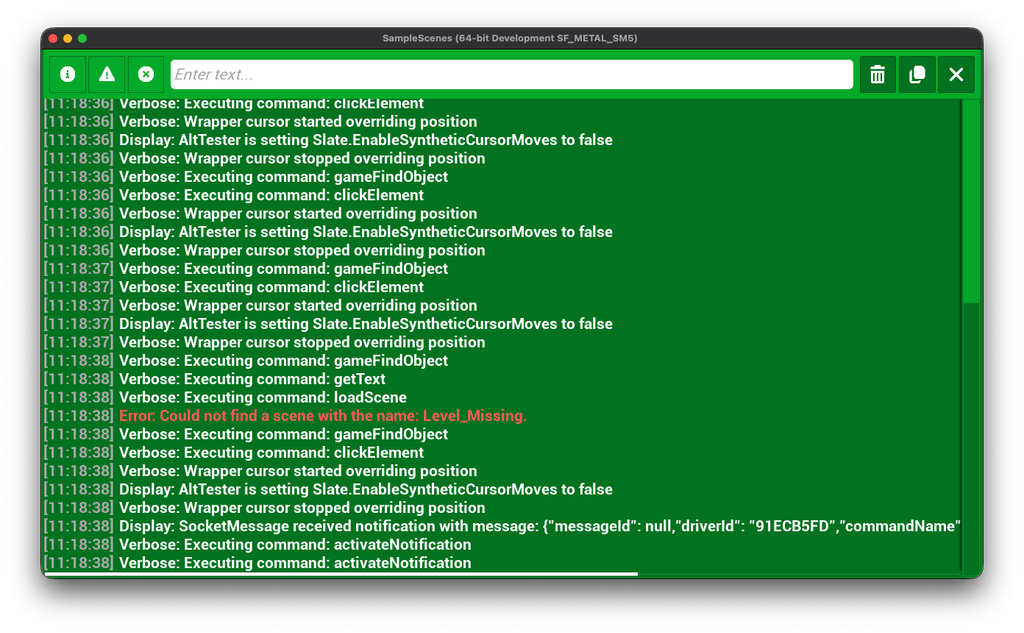
Note: For now, the panel shows only the AltTester® SDK’s own logs (the LogAltTester category). Other logs from your game or the engine aren’t shown yet.
Smarter handling of apps in the background (Android & iOS)
When the game goes to the background, AltTester® Desktop now shows it as “in background” instead of losing it without saying why.
- The app reconnects automatically when it comes back to the foreground, even after a long time in the background
- Commands sent while the app is in the background return a clear error instead of a timeout, and they aren’t replayed later (for example, a tap won’t fire unexpectedly when the app resumes)
Inspect minimized games
On desktop platforms, screenshots and Live Update keep working when the game window is minimized, and inspecting a minimized game no longer crashes it. You can keep the game minimized while you work in AltTester® Desktop.
Movable AltTester® icon
Drag the AltTester® icon anywhere on the screen so it doesn’t cover the UI you’re testing.
“Show Popup” setting now works
Turn off Project Settings → AltTester® → Show Popup to hide the popup and the icon. The app still connects to AltTester® Server, and your screenshots and recordings stay clean.
Test paused games
AltTester® commands now run while the game is paused (for example, with the Pause console command or SetGamePaused). You can inspect and drive pause menus and other paused states.
Precompiled SDK for custom engines and Unique build environments
The precompiled SDK package now works with:
- Custom (source-built) engines whose engine classes were changed
- Targets that use a Unique build environment (BuildEnvironment = TargetBuildEnvironment.Unique), for both the editor and the packaged game
You don’t need to rebuild the SDK from source or apply manual workarounds.
Also in this Unreal SDK release
- Faster object search in UI-heavy games. Collecting widgets is now faster, which helps in games with large or complex UIs.
- Clearer connection messages
Bug fixes and polish for the AltTester® Unreal SDK:
- The plugin no longer rewrites its own .uplugin file, so it doesn’t show up as modified in source control, and packaged builds don’t log a warning about it
- Fixed several stability and reliability issues
⚠️ Before you upgrade your AltTester® Unreal SDK
Update your AltTester® Desktop / Server. AltTester® Unreal SDK 1.3.0 doesn’t work with earlier versions of AltTester® Desktop / Server. Use the latest version, 2.4.0.
Check selectors that use generated names. Because names are now stable, selectors that use generated suffixes (for example, W_LyraFrontEnd_C_2147…) or the internal name of an actor that has a label need to be updated. Recording them again in AltTester® Desktop is the quickest way.
What’s new in AltTester® Unity SDK
Clean production builds
The iOS post-process, native plugins, input axes, and extra link.xml code now apply only to instrumented builds. Opening the AltTester® Editor window no longer adds ALTTESTER to Player Settings, so builds you make from Unity’s Build Settings or Build Profiles are no longer instrumented by accident. The AltTester® prefab is now removed after every build, including command-line builds and builds made while the Editor window is closed.
Touches that behave like a real device
On the legacy Input Manager, taps and BeginTouch/MoveTouch/EndTouch now report correct tapCount, deltaTime, deltaPosition, and Stationary phases. Each phase lasts exactly one frame, and the touch is applied before your scripts’ Update() runs. Custom input code that polls Input.touches no longer sees a touch begin twice.
Works with Managed Stripping
You can drive instrumented builds again when Managed Stripping Level is set to Low, Medium, or High. Dedicated Server builds are now detected as instrumented, too.
Unity 6.5 support
Added support for Unity 6.5.
Unity key names in Input.GetKey
Input.GetKey, GetKeyDown, and GetKeyUp(string) now accept Unity key names like space and left shift. Before, these threw an exception every frame while a driver was connected.
More reliable connections
- The connection panel shows when the server becomes unreachable, for example, when its network goes down.
- A WS/WSS mismatch now shows the wrong-protocol error instead of staying on “Waiting to connect”.
- Minimizing and restoring the app no longer throws an exception.
- Apps in the background stay in the list of connected apps.
- Frame stutters caused by the keep-alive check are fixed.
Bug fixes and polish in AltTester® Unity SDK 2.4.0
- A broken AltTester® prefab is now repaired in place, also in batch-mode builds, so your scenes keep their reference to it.
- The Editor no longer adds a second AltTester® prefab to a scene that already has one.
- Changes in the AltTester® Editor window are now saved with File → Save Project.
- A failed build no longer leaves files behind in Assets/Resources.
- AltTester® now logs why it doesn’t start in Release builds, instead of failing silently.
- C# bindings: fixed race conditions that could cause flaky command responses.
- Python bindings: notification callbacks added with overwrite=True are now called once instead of repeatedly.
⚠️ Before you upgrade to AltTester® Unity SDK 2.4.0
- Delete Assets/AltTester before you import the new .unitypackage. The assemblies moved to new folders, so importing over the old version causes duplicate assembly errors. Your Editor settings are kept. You can skip this if you installed through OpenUPM.
- Update your log filters. The log prefix changed from |Tester| to |AltTester|.
- You can remove the TMP_PRESENT define. AltTester® now detects TextMeshPro at runtime.
Need help?
For general setup steps and an overview of how AltTester® works, check the AltTester® documentation. If you have questions about the new Unreal features, run into issues after upgrading, or want to talk through your setup, join us on Discord. The team is there, and other AltTester® users often share what worked for them.
We’d also like to hear how the AltTester® Unreal SDK 1.3.0 works with your projects, especially if you use World Partition, custom engines, or test on mobile.